

Setting up a React (Vite) Monorepo project with Yarn Workspaces
For better scalability, better dependency management, enhanced collaboration and reusability.

🤔 What is a Monorepo Architectural Concept?
Monorepo is an architectural idea in which all of a project's code is kept in a single repository as opposed to being dispersed over several repositories. Code for various features, settings (such as web and mobile), and even languages can be included in this. By keeping all of the code in one location, the objective behind this notion is to simplify dependency management and enhance teamwork. Monorepo also makes it simple to share code among various project components and can streamline the update-releasing procedure. Implementing Monorepo is possible with the aid of tools like Lerna, Yarn Workspaces, and NX Workspaces.
🤔 Benefits of using Monorepo Architectural Concept?
A monorepo architectural design has various advantages for a project:
Better collaboration: Team members can work together and share code more easily when the code is all in one location.
Better management of dependencies: A monorepo makes it simpler to manage dependencies between different project components. The likelihood that various sections of the code would malfunction as a result of modifications to shared dependencies is decreased.
The release process is made simpler: Since a monorepo makes it possible to release updates to the entire project at once rather than having to do so separately for each repository.
The codebase has a single source of truth: Monorepo gives the code a single home, making it simpler to comprehend the architecture and design of the codebase.
Better scalability: Monorepo makes it possible to expand without having to create new repositories.
Reusability: Monorepo enables the sharing of common code between teams and projects, improving reuse and speeding up development.
🤔 What is Yarn Workspaces?
The Yarn package manager has a feature called Yarn Workspaces that enables the management of many packages within a single repository, or workspace.
Developers can simply manage and share dependencies across those packages thanks to the ability to put related packages together in a monorepo structure.
Yarn Workspaces enables you to manage the codebase of your project by having a single root package.json file and several package.json files in various subfolders that contain the code for distinct packages.
Although each package may have its own scripts and dependencies, they may also share these elements with other packages in the workspace.
This makes it simple to manage dependencies in a centralized manner and to share code among various project components.
Additionally, Yarn Workspaces makes it simple to link different packages together so you can test and develop them alone as well as as a component of a larger project. It also enables simple package versioning and publishing to a package manager like npm.
⚙️ The Setup
❗️ In this setup we are going to create a React monorepo setup using yarn workspaces and applications created with vite.
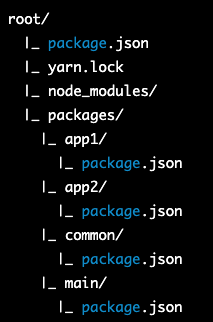
We will be creating this project in three parts. two will be subparts of the main application and one being a common repository, more like a container for reusable components for the other two parts.
Here is a visual representation of the monorepo structure that we are going end up with after completing this demonstration.
Step 1️⃣:
Create a new folder and open it with your favourite code editor. This will be the project's
rootfolder.Inside the root folder create a new
package.jsonfile and add the following contents to it:{ "private": true, "workspaces": { "packages": [ "./packages/main", "./packages/app1", "./packages/app2", "./packages/common" ] }, "scripts": { "main": "yarn workspace main dev" } }
Step 2️⃣:
- Create a new folder inside the root and name it
packages
Create four more folders inside packages and name them:
app1
app2
common
main
main is going to be our project application.
app1 is going to be a sub project (or) a feature of the main application.
app2 is going to be the second sub project (or) a feature of the main application.
common is going to be a repository containing reusable components likely to be used by both app1 and app2.
After creating the folders, move into each folder one at a time and run
npm create vite@latestto initialize a new project using vite. Follow the prompts and give a suitable choice of framework along with a suitable variant. For this demonstration, I will be choosing
reactas the framework andjavascriptas the variant.Once done, the structure of every project folder under
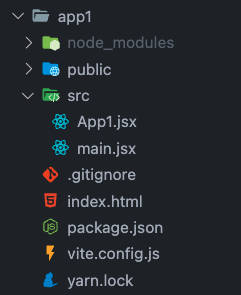
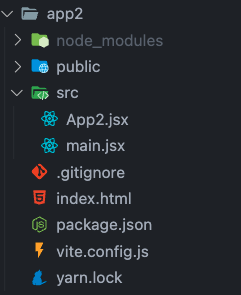
packagesshould look like this:

Step 3️⃣:
- Clean up and rename the files in the
src/folder of app1, app2 and common.

Add the following contents to the following files:
app1/src/App1.jsximport React from 'react'; import { Button } from 'common'; export function App1() { return ( <div> <h1>App 1</h1> <Button text='App1 Button test' /> </div> ); }app1/src/main.jsxexport { App1 } from './App1';app1/package.jsonadd a new property for entry
{ ... "main": "./src/main.jsx", ... }"dependencies": { // dependency name should be same as the repo's name in its package.json // * symbolizes any version of the package, but you can meantion any version the repository supports ... "common": "*", ... }app2/src/App2.jsximport React from 'react'; import { Button } from 'common'; export function App2() { return ( <div> <h1>App 2</h1> <Button text='App2 Button test' /> </div> ); }app2/src/main.jsxexport { App2 } from './App2';app2/package.json{ ... "main": "./src/main.jsx", ... }"dependencies": { // dependency name should be same as the repo's name in its package.json // * symbolizes any version of the package, but you can meantion any version the repository supports ... "common": "*", ... }common/src/components.jsximport React from 'react'; export function Button(props) { return <button>{props.text}</button>; }common/src/main.jsxexport { Button } from './components';common/package.json{ ... "main": "./src/main.jsx", ... }No additions under dependencies in this project.
scriptsother than build inpackage.jsonof app1, app2 and common can be deleted as we won't be starting these vite applications independently. These repositories are meant to be exported and imported into main which will be served to the thin client.
Step 4️⃣:
Prepare the main application
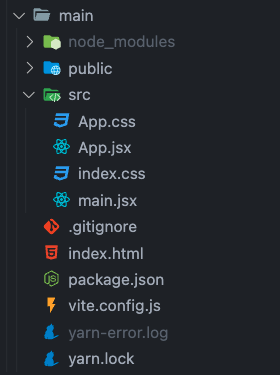
The structure of the main should be looking like this with the following contents:
main/src/App.jsximport React from 'react'; import './App.css'; import { App1 } from 'app1'; import { App2 } from 'app2'; function App() { return ( <div> <h1>Main Application</h1> <App1 /> <App2 /> </div> ); } export default App;main/src/main.jsximport React from 'react' import ReactDOM from 'react-dom/client' import App from './App' import './index.css' ReactDOM.createRoot(document.getElementById('root')).render( <React.StrictMode> <App /> </React.StrictMode>, )main/package.json"scripts": { "dev": "vite", "build": "vite build", "preview": "vite preview" }, // dependency name should be same as the repo's name in its package.json // * symbolizes any version of the package, but you can meantion any version the repository supports "dependencies": { ... "app1": "*", "app2": "*", ... },
Step 5️⃣:
Back inside the
rootdirectory, run:yarnto download all the dependencies needed by the whole project. you will notice that a
node_modulesfolder will be added to the root folder. Also anode_modulesfolder will be added to each of app1, app1, common and main❗️ When you run
yarnin the root folder of a monorepo, it will install all the dependencies defined in the rootpackage.jsonfile and all the dependencies defined in thepackage.jsonfiles of all the packages in thepackagesfolder.In order to do so, yarn will create a
node_modulesfolder in the root folder, and then it will create anode_modulesfolder inside of each of the packages in thepackagesfolder.This is done to keep the dependencies of each package separated and isolated from each other. By doing so, it will allow each package to have its own version of the dependencies, and avoids conflicts that could happen if they were all installed in a single global
node_modulesfolder.Additionally, this allows each package to have its own set of dependencies and to have a specific versions of those dependencies that can be different from other packages, while still being able to share common dependencies and have them in a centralized location.
Step 6️⃣:
Fire up the main application using:
yarn mainThis launches the monorepo application 🎉

💭 Conclusion
In conclusion, implementing a monorepo architecture can significantly enhance teamwork and codebase management. Developers may simply share code and manage dependencies among various areas of the project by keeping all of the code in one repository.
Better scalability, better dependency management, enhanced collaboration, a streamlined release process, and reusability are all possible with monorepo. Monorepo might not be appropriate for all projects, so it's crucial to keep that in mind and always balance the benefits and drawbacks before opting to utilise it.


